
FortiClient Dial-Up IPsec VPN Guide: Simple FortiGate PSK + Peer ID Fixes
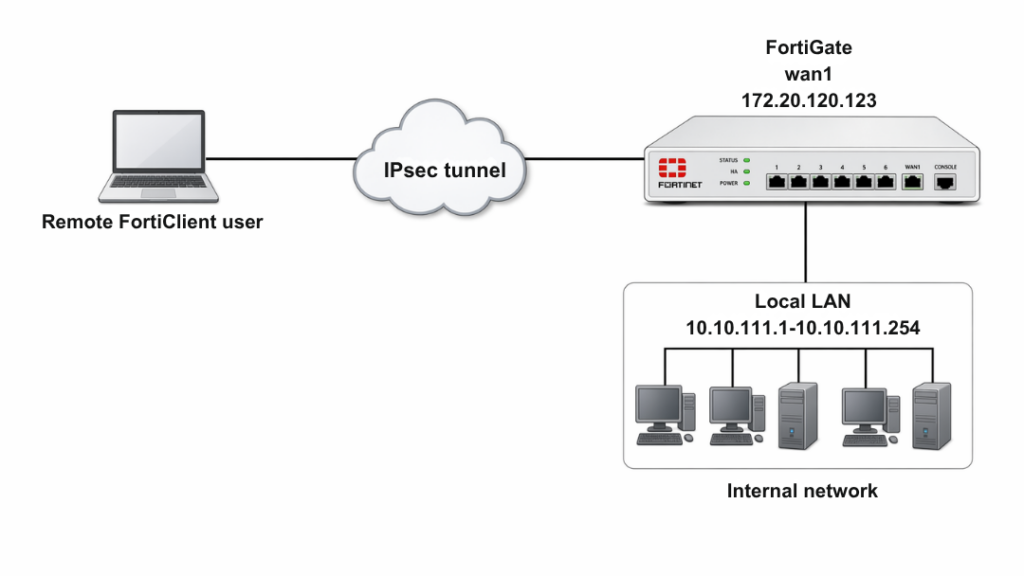
Description
Learn how to configure a FortiGate Remote Access (Dial-Up) IPsec VPN with FortiClient using Pre-Shared Key (PSK), User Authentication (XAuth), and Peer ID. This guide includes full GUI + CLI configuration, FortiClient setup, and real troubleshooting outputs.
Scope
This article covers:
- FortiGate as VPN server
- FortiClient as dial-up client
- PSK + Username/Password authentication
- Peer ID usage (important for multiple tunnels)
- Full CLI configuration (no skipped lines)
- IP pool assignment & split tunneling
- Firewall policies
- Real diagnose outputs
Solution
Key Concept (VERY IMPORTANT)
If multiple dial-up VPNs exist on the same interface:
Each tunnel must have a unique Peer ID
- FortiClient sends Local ID
- FortiGate matches it with Peer ID
- Correct tunnel is selected
STEP 1: GUI Configuration (Quick Setup)
Create User & Group
- Go to User & Authentication > User Definition
- Create user:
vpnuser1
- Create user:
- Go to User Groups
- Create group:
vpngroup - Add member:
vpnuser1
- Create group:
IPsec Wizard
- Go to VPN > IPsec Wizard
VPN Setup:
- Template: Remote Access
- Remote Device: FortiClient
Authentication
- Interface:
wan1 - Method: Pre-shared Key
- PSK:
your-psk - User Group:
vpngroup
Policy & Routing
- Local Interface:
lan - Local Address:
local_network - Client Range:
10.10.2.1 – 10.10.2.200
Optional (Peer ID – IMPORTANT)
- Go to VPN > IPsec Tunnels
- Convert to custom tunnel
- Set:
- Accept Type: Specific Peer ID
- Peer ID:
dialup1
STEP 2: CLI Configuration
User & Group
config user local
edit "vpnuser1"
set type password
set passwd your-password
next
end

config user group
edit "vpngroup"
set member "vpnuser1"
next
end
Internal Interface + Networks
config system interface
edit "lan"
set vdom "root"
set ip 10.10.111.1 255.255.255.0
next
end

config firewall address
edit "local_subnet_1"
set subnet 10.10.111.0 255.255.255.0
next
edit "local_subnet_2"
set subnet 10.10.112.0 255.255.255.0
next
end

config firewall addrgrp
edit "local_network"
set member "local_subnet_1" "local_subnet_2"
next
end
WAN Interface
config system interface
edit "wan1"
set vdom "root"
set ip 172.20.120.123 255.255.255.0
next
end
Client IP Pool
config firewall address
edit "client_range"
set type iprange
set comment "VPN client range"
set start-ip 10.10.2.1
set end-ip 10.10.2.200
next
end
Phase1 Interface (CRITICAL CONFIG)
config vpn ipsec phase1-interface
edit "for_client"
set type dynamic
set interface "wan1"
set mode aggressive
set peertype one
set peerid "dialup1"
set net-device enable
set mode-cfg enable
set proposal aes128-sha256 aes256-sha256 aes128-sha1 aes256-sha1
set dpd on-idle
set xauthtype auto
set authusrgrp "vpngroup"
set assign-ip-from name
set ipv4-name "client_range"
set dns-mode auto
set ipv4-split-include "local_network"
set save-password enable
set psksecret your-psk
set dpd-retryinterval 60
next
end
Phase2 Interface
config vpn ipsec phase2-interface
edit "for_client"
set phase1name "for_client"
set proposal aes128-sha1 aes256-sha1 aes128-sha256 aes256-sha256 aes128gcm aes256gcm chacha20poly1305
next
end
Firewall Policy
config firewall policy
edit 1
set name "inbound"
set srcintf "for_client"
set dstintf "lan"
set srcaddr "client_range"
set dstaddr "local_network"
set action accept
set schedule "always"
set service "ALL"
next
end
STEP 3: FortiClient Configuration
- Open FortiClient → Remote Access
- Add new VPN
Settings:
- VPN Type: IPsec
- Remote Gateway: FortiGate IP
- Authentication: PSK
- PSK:
your-psk
Advanced Settings
Phase1 → Local ID: dialup1
Connect
- Enter:
- Username:
vpnuser1 - Password
- Username:
- Click Connect
Troubleshooting (CRITICAL SECTION)
Enable Debug
diagnose debug reset
diagnose debug application ike -1
diagnose debug enable
Common Error
no matching peer ID
Fix:
- FortiClient Local ID must match:
set peerid "dialup1"
Check VPN Status
diagnose vpn ike gateway list
Expected Output:
vd: root/0
name: for_client_0
version: 1
interface: port1 15
addr: 172.20.120.123:4500 ->172.20.120.254:64916
created: 37s ago
xauth-user: vpnuser1
assigned IPv4 address: 10.10.1.1/255.255.255.255
nat: me peer
IKE SA: created 1/1 established 1/1 time 10/10/10 ms
IPsec SA: created 1/1 established 1/1 time 0/0/0 ms
id/spi: 1 b40a32d878d5e262/8bba553563a498f4
direction: responder
status: established 37-37s ago = 10ms
proposal: aes256-sha256
key: f4ad7ec3a4fcfd09-787e2e9b7bceb9a7-0dfa183240d838ba-41539863e5378381
lifetime/rekey: 86400/86092
DPD sent/recv: 00000000/00000a0e
Check Tunnel Details
diagnose vpn tunnel list
Expected Output:
list all ipsec tunnel in vd 0
name=for_client_0 ver=1 serial=3 172.20.120.123:4500->172.20.120.254:64916 tun_id=172.20.120.254
bound_if=15 lgwy=static/1 tun=intf/0 mode=dial_inst/3 encap=none/984 options[03d8]=npucreate_dev no-sysctlrgwy-chgrport-chg frag-rfcaccept_traffic=1
parent=for_client index=0
proxyid_num=1 child_num=0 refcnt=12 ilast=3 olast=3 ad=/0
stat: rxp=1 txp=0 rxb=16402 txb=0
dpd: mode=on-idle on=1 idle=20000ms retry=3 count=0 seqno=0
natt: mode=keepalive draft=32 interval=10 remote_port=64916
proxyid=for_client proto=0 sa=1 ref=2 serial=1 add-route
src: 0:0.0.0.0-255.255.255.255:0
dst: 0:10.10.1.1-10.10.1.1:0
SA: ref=4 options=2a6 type=00 soft=0 mtu=1422 expire=42867/0B replaywin=2048
seqno=1 esn=0 replaywin_lastseq=00000001 itn=0
life: type=01 bytes=0/0 timeout=43189/43200
dec: spi=36274d14 esp=aes key=16 e518b84b3c3b667b79f2e61c64a225a6
ah=sha1 key=20 9cceaa544ed042fda800c4fe5d3fd9d8b811984a
enc: spi=8b154deb esp=aes key=16 9d50f004b45c122e4e9fb7af085c457c
ah=sha1 key=20 f1d90b2a311049e23be34967008239637b50a328
dec:pkts/bytes=1/16330, enc:pkts/bytes=0/0
Important Notes
- Peer ID is mandatory for multiple dial-up tunnels
- Always match:
- PSK
- Peer ID
- Use:
mode-cfg enableassign-ip-from
- Split tunnel improves performance
- Strong encryption recommended
FAQ
Why Peer ID is required?
To match the correct tunnel when multiple VPNs exist.
Why VPN connects but no internet?
Check:
- Firewall policy
- Address group
- Split tunnel
Can I use certificate instead of PSK?
Yes, but configuration changes.
What is XAuth?
- Username/password authentication for VPN users.