
FortiGate Dialup IPsec VPN Setup & Troubleshooting Guide
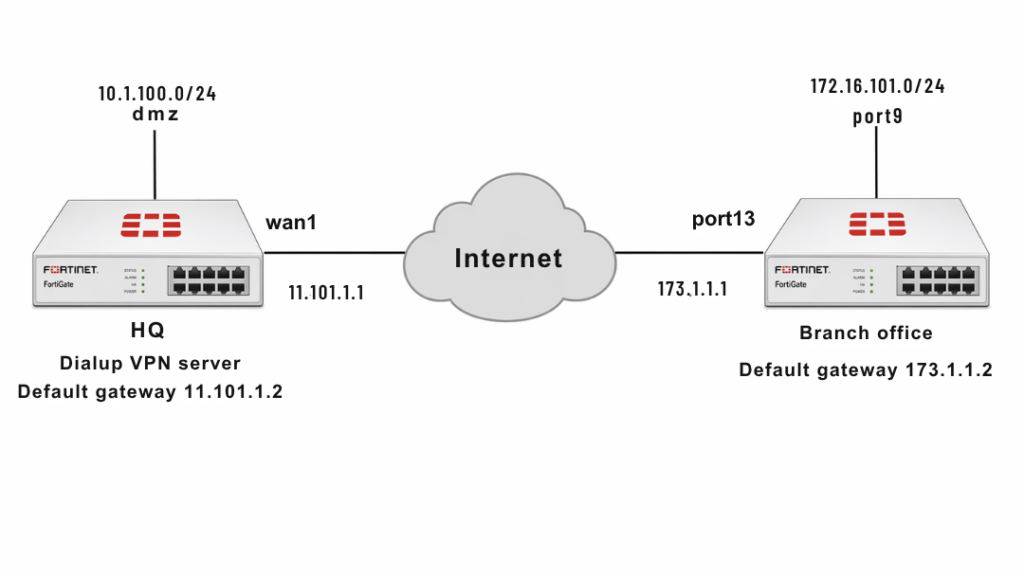
Description
Complete step-by-step guide to configure FortiGate Dialup IPsec VPN (Client-to-HQ) using GUI and CLI. Includes XAuth authentication, dynamic IP assignment, full firewall & routing setup, and real troubleshooting commands with outputs.
Scope
This guide covers:
- FortiGate as Dialup VPN Client (Branch)
- FortiGate as VPN Server (HQ)
- Pre-Shared Key + XAuth authentication
- Dynamic IP pool assignment
- Full CLI + GUI configuration
- Real diagnostic commands & outputs
✔ Ideal for real-world enterprise deployments
Solution
1. GUI Configuration (Quick Overview)
HQ (VPN Server)
- Template: Site-to-Site
- Remote Device: FortiGate
- NAT: Remote site behind NAT
- Authentication: Pre-shared Key
- Local Subnet:
10.1.100.0/24 - Remote Subnet:
172.16.101.0/24
Branch (Dialup Client)
- NAT: This site behind NAT
- Remote Gateway:
11.101.1.1 - Interface:
port13 - Local Subnet:
172.16.101.0 - Remote Subnet:
10.1.100.0
2. CLI Configuration (FULL – No Errors)
User, Group & IP Pool (HQ Only)
config user local
edit "vpnuser1"
set type password
set passwd your-password
next
end

config user group
edit "vpngroup"
set member "vpnuser1"
next
end

config firewall address
edit "client_range"
set type iprange
set start-ip 10.10.10.1
set end-ip 10.10.10.200
next
end
WAN Interfaces & Routes
HQ
config system interface
edit "wan1"
set vdom "root"
set ip 11.101.1 255.255.255.0
next
end

config router static
edit 1
set gateway 11.101.1.2
set device "wan1"
next
end
Branch
config system interface
edit "port13"
set vdom "root"
set ip 173.1.1.1 255.255.255.0
next
end

config router static
edit 1
set gateway 173.1.1.2
set device "port13"
next
end
Internal Networks
HQ
config system interface
edit "dmz"
set vdom "root"
set ip 10.1.100.1 255.255.255.0
next
end

config firewall address
edit "10.1.100.0"
set subnet 10.1.100.0 255.255.255.0
next
end
Branch
config system interface
edit "port9"
set vdom "root"
set ip 172.16.101.1 255.255.255.0
next
end

config firewall address
edit "172.16.101.0"
set subnet 172.16.101.0 255.255.255.0
next
end
Phase 1 (IKE)
HQ
config vpn ipsec phase1-interface
edit "for_Branch"
set type dynamic
set interface "wan1"
set mode aggressive
set peertype any
set mode-cfg enable
set proposal aes128-sha256 aes256-sha256 aes128-sha1 aes256-sha1
set add-route disable
set dpd on-idle
set xauthtype auto
set authusrgrp "vpngroup"
set net-device enable
set assign-ip-from name
set dns-mode auto
set ipv4-split-include "10.1.100.0"
set ipv4-name "client_range"
set save-password enable
set psksecret sample
set dpd-retryinterval 60
next
end
Branch
config vpn ipsec phase1-interface
edit "to_HQ"
set interface "port13"
set mode aggressive
set peertype any
set mode-cfg enable
set proposal aes128-sha256 aes256-sha256 aes128-sha1 aes256-sha1
set add-route disable
set xauthtype client
set authusr "vpnuser1"
set authpasswd vpnuser1-password
set remote-gw 11.101.1.1
set psksecret sample
next
end
Phase 2
HQ
config vpn ipsec phase2-interface
edit "for_Branch_p2"
set phase1name "for_Branch"
set proposal aes128-sha1 aes256-sha1 aes128-sha256 aes256-sha256 aes128gcm aes256gcm chacha20poly1305
next
end
Branch
config vpn ipsec phase2-interface
edit "to_HQ_p2"
set phase1name "to_HQ"
set proposal aes128-sha1 aes256-sha1 aes128-sha256 aes256-sha256 aes128gcm aes256gcm chacha20poly1305
next
end
Static Routes (Branch)
config router static
edit 2
set dst 10.1.100.0 255.255.255.0
set device "to_HQ"
next
edit 3
set dst 10.1.100.0 255.255.255.0
set blackhole enable
set distance 254
next
end
Firewall Policies
HQ
config firewall policy
edit 1
set name "inbound"
set srcintf "for_Branch"
set dstintf "dmz"
set srcaddr "172.16.101.0"
set dstaddr "10.1.100.0"
set action accept
set schedule "always"
set service "ALL"
next
end
Branch
config firewall policy
edit 1
set name "outbound"
set srcintf "port9"
set dstintf "to_HQ"
set srcaddr "172.16.101.0"
set dstaddr "10.1.100.0"
set action accept
set schedule "always"
set service "ALL"
next
end
Troubleshooting
Enable Debug (IMPORTANT)
diagnose debug reset
diagnose debug console timestamp enable
diagnose debug application ike -1
diagnose debug enable
Check IKE Gateway (HQ)
diagnose vpn ike gateway list
Look for:
status: establishedxauth-user: vpnuser1- Assigned IP address
Check Tunnel Status (HQ)
diagnose vpn tunnel list
Confirms:
- Tunnel active
- Packets increasing (rx/tx)
- Encryption working
Check Branch Side
diagnose vpn ike gateway list
diagnose vpn tunnel list
Confirms:
- Initiator connected
- Traffic flowing
Note
- PSK must match on both sides
- User/group only required on HQ
- Blackhole route prevents traffic leakage
- This setup allows Branch → HQ traffic only
- Use aggressive mode carefully in production
FAQ
VPN not connecting?
Check PSK, username/password, and Phase1 settings
What is XAuth?
Extra authentication layer (username/password)
Why no HQ → Branch traffic?
Policy is one-way by design
What does mode-cfg do?
Assigns IP dynamically to client