FortiGate 7.4.2+ Upgrade: License Mistakes You’ll Regret
Description
Learn how to fix FortiGate 7.4.2 License Issues, verify license status, and avoid common firmware upgrade and downgrade mistakes.
Scope
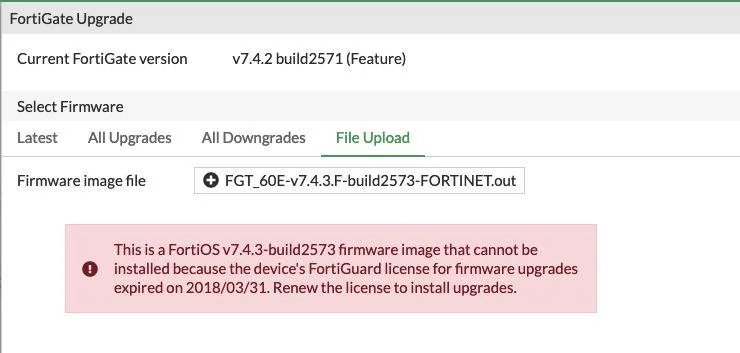
If you manage a firewall, you must understand recent licensing changes. From version 7.4.2 and above, a FortiGate license is needed for firmware upgrade.
This guide is for both beginners and advanced users regarding FortiGate 7.4.2 License Issues. It explains license requirements, how to check status, and what happens if the license expires.
Scope: FortiGate devices running FortiOS v7.4.2 and above.
How to Check FortiGate License Status
You can verify the license status using the CLI command below:
Solution
Why a FortiGate License Is Required
Starting with FortiOS v7.4.2, Fortinet requires an active support license to perform firmware upgrades.
As a result, devices without a valid contract may face FortiGate 7.4.2 License Issues and cannot install newer firmware versions. This change ensures proper support, security updates, and controlled access to firmware releases.
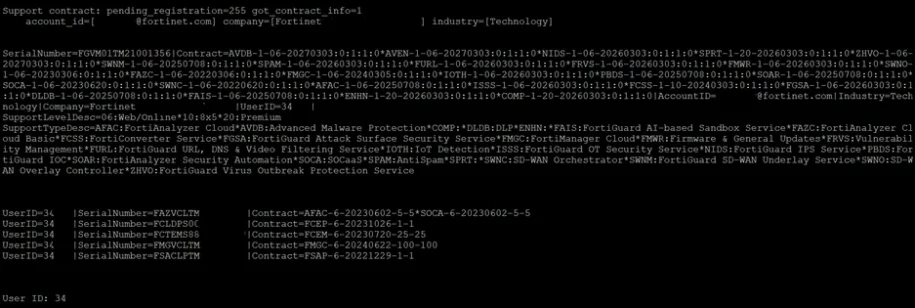
diagnose test update info contract
This command shows whether your device has a valid support contract.
Understanding Inactive License Output
If the license is inactive, the output will look similar to this
Support contract: pending_registration=0 got_contract_info=0
account_id=[] company=[] industry=[]
Contract=AVDB-2-20-19700101*NIDS-2-20-19700101
No contract information.
No user ID.
What These Fields Mean
- pending_registration=0 → Device is not waiting for registration
- got_contract_info=0 → No contract information retrieved
- account_id=[] → No Fortinet account linked
- company=[] → No company registered
- industry=[] → Industry field is empty
- Contract line → Shows default or expired service placeholders (not active)
- No user ID → No registered user associated
⇒ Therefore, this confirms that no active license is present, and firmware upgrades will fail.
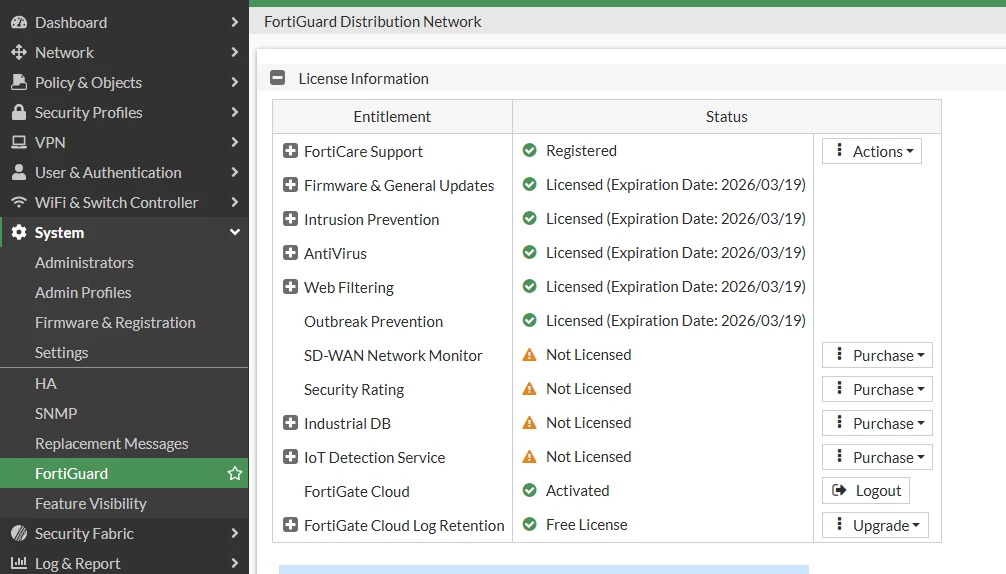
Understanding Active License Output
In contrast, an active license will display:
- Account ID
- Company name
- Contract details
- User ID
Originally, in FortiGate 7.4.2 License Issues, this is shown as a GUI screenshot in FortiGate, where all license details are visible.
⇒ If these details appear, your device is properly licensed and ready for firmware upgrades.
Firmware Upgrade Restriction Rule
License timing directly affects upgrade eligibility.
- If the license expiration date is earlier than the firmware’s first GA (General Availability) release date
→ Upgrade to that firmware version will be blocked - If the license is still valid at the time of release
→ Upgrade will be allowed
This rule ensures that only supported devices receive new firmware version.
Firmware Downgrade Behavior
Downgrades follow a different rule.
- Downgrading between major versions is not restricted
- This is because older firmware versions may still fall within the license validity period
⇒ So, even without a valid license, FortiGate 7.4.2 License Issues may occur, but downgrades may still work.
What Happens If the License Expires
If your license expires:
- Firmware upgrades will stop working
- Access to newer versions will be restricted
In that case, you should:
- Contact your Fortinet sales representative
- Reach out to an authorized partner
- Renew your support contract
Note / Tips
- Always check license status before upgrading firmware
- Keep your contract active to avoid upgrade issues
- Monitor expiration dates regularly
- Use CLI commands for quick verification
- Plan renewals before firmware upgrade cycles
FAQ
Is a FortiGate license required for firmware upgrade?
Yes, from FortiOS v7.4.2 and above, an active license is required.
What command checks FortiGate license status?
Use: diagnose test update info contract
Why is my firmware upgrade blocked on FortiGate?
Your license may have expired or be invalid before the firmware release date.
Can I upgrade FortiGate firmware without a license?
No, upgrades are restricted without an active license in v7.4.2+.
Are firmware downgrades allowed without a license?
Yes, downgrades are usually allowed because they may fall within valid license periods.
What should I do if my FortiGate license expires?
You should contact Fortinet sales or a partner to renew your license.