How to Block Risky Firmware Updates Instantly
Description
Learn how FortiGate Block Risky Firmware Updates after license expiry with rules, restrictions, and secure policies to ensure safe upgrades and deployments.
Scope
This guide explains how FortiGate firmware upgrades behave after a support contract expires under Block Risky Firmware Updates. It is useful for both beginners and network administrators.
You will learn which upgrades are blocked, which are allowed, and how license status affects firmware updates under Block Risky Firmware Updates, including its impact on upgrade behavior and system control.
Solution
What Happens When Support Contract Expires?
When a FortiGate support contract expires:
- Major and minor firmware upgrades are blocked
- FortiGuard upgrades become unavailable
- Only limited upgrade actions are allowed
⇒ This behavior is enforced directly in the GUI.
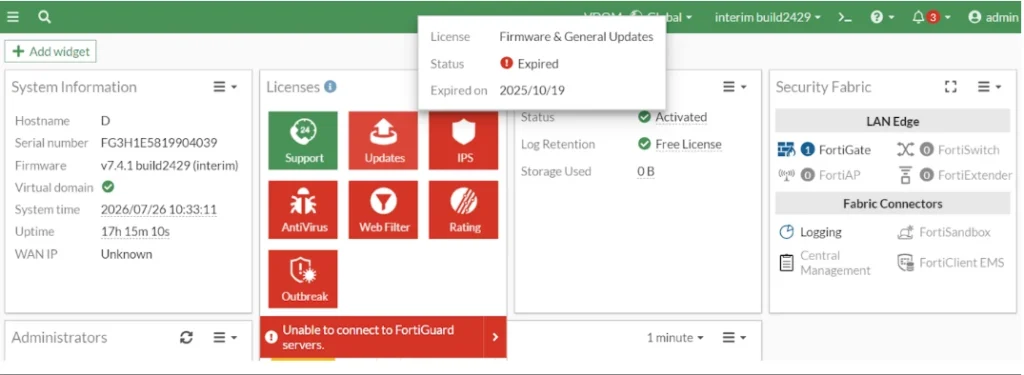
Check Support Contract Status
To verify license status:
Go to:
Dashboard → Status → Licenses Widget
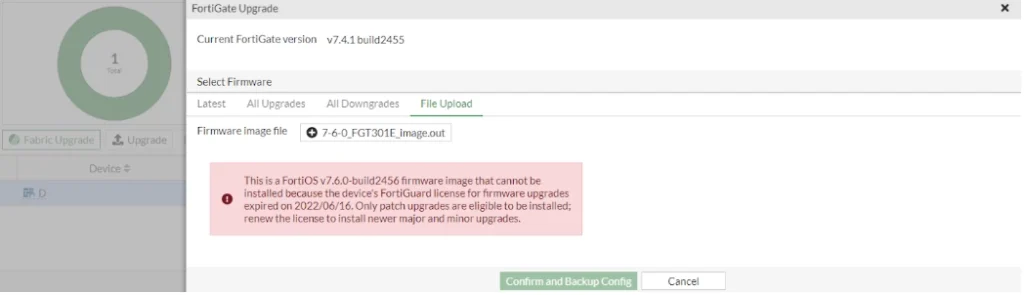
Major & Minor Firmware Upgrades (Blocked)
If the license is expired:
- You cannot upgrade to a higher major version
- You cannot upgrade to a higher minor version
✔ Example:
- ✖ 7.4.1 → 7.6.0 → Blocked
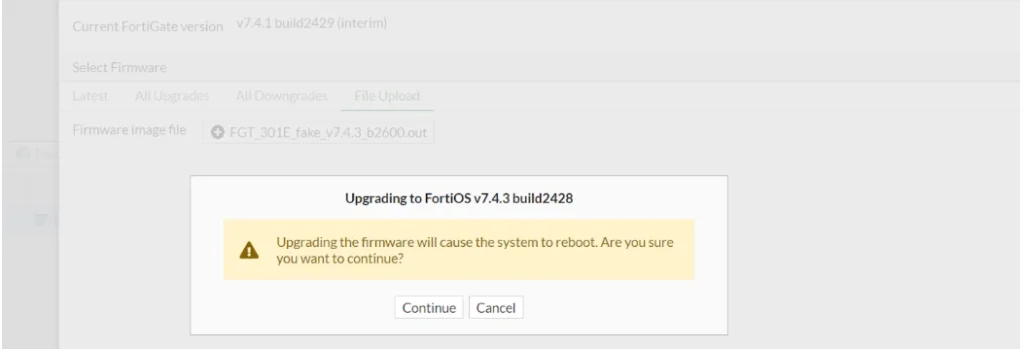
Patch Upgrades Still Allowed
FortiGate allows patch-level upgrades even without support.
✔ Example:
- ✔ 7.4.1 → 7.4.3 → Allowed
⇒ This ensures critical security updates remain available.
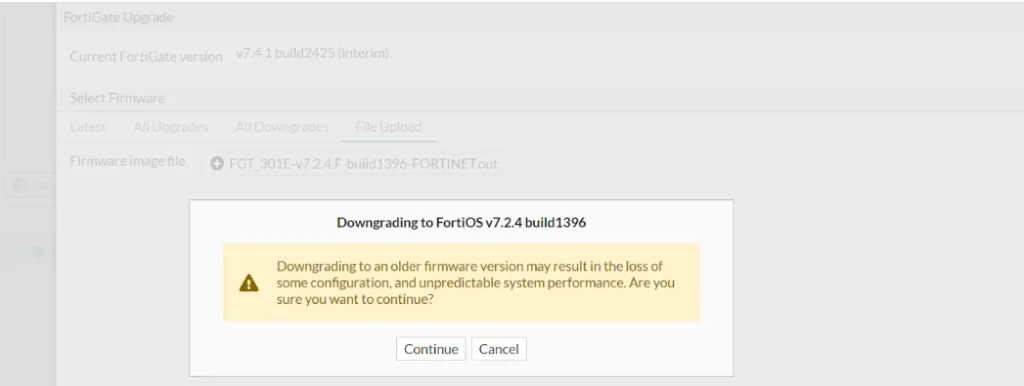
Downgrade is Allowed
You can downgrade firmware even with an expired license.
✔ Example:
- ✔ 7.4.1 → 7.2.4 → Allowed
Improved Enforcement (v7.4.2 and Later)
From FortiOS 7.4.2, behavior is stricter.
Now FortiGate checks:
- License expiry date
- Firmware GA (General Availability) release date
Key Rule:
If the license expired before the GA release, upgrade is blocked.
✔ Example:
- License expired: 2022
- Firmware GA: 2023
- Result: ✖ Upgrade blocked
⇒ Even minor upgrades may fail in this case.
Important Notes / Tips
- Always check license before upgrading
- Renew support contract for major upgrades
- Patch updates remain available for security fixes
- GUI enforces restrictions automatically
- Plan upgrades before license expiration
FAQ
Can I upgrade FortiGate without a license?
You can only install patch updates, not major or minor upgrades.
Why is my upgrade blocked?
Your support contract has expired, and FortiGate restricts upgrades.
Can I downgrade firmware?
Yes, downgrades are allowed even without a valid contract.
Are security updates still available?
Yes, patch upgrades are allowed for security purposes.
Where do I check license status?
Go to Dashboard → Status → Licenses.